01 / CLARITY
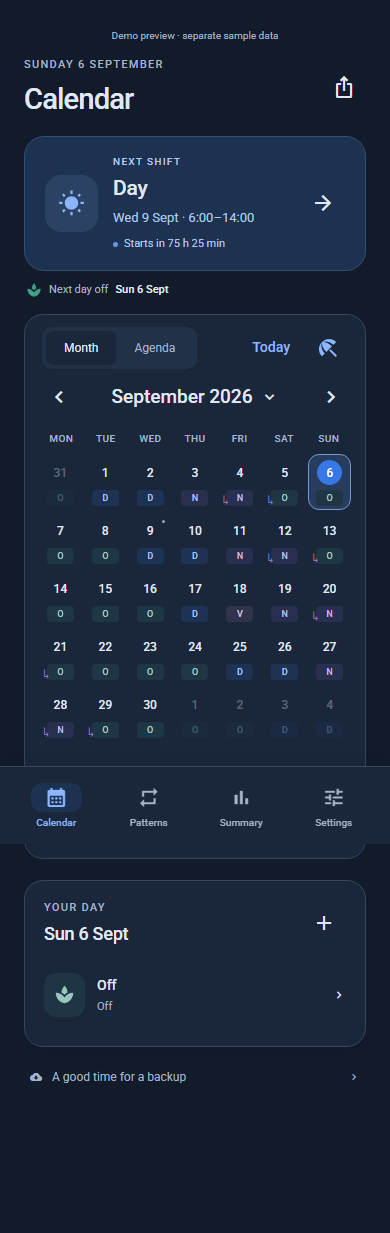
Your month, at a glance.
Color-coded shifts turn a busy rota into a clear picture. Know what’s next, and spot the spaces in between.
FOR THE DAYS THAT DON’T DO 9–5
Your schedule changes. Life keeps happening.
Bring it all together in one beautifully clear calendar, and make more room for you.
Different work.
Same need for balance.
LESS JUGGLING. MORE LIVING.
Your early starts, late finishes, and well-earned days off. Finally, a calendar that gets the way you work.
Color-coded shifts turn a busy rota into a clear picture. Know what’s next, and spot the spaces in between.
Build a pattern once and apply it to your dates. Rotating weeks and changing shifts feel a whole lot simpler.
Choose reminder times that fit your routine. A little nudge before you need to be out the door.
A CALENDAR THAT MOVES WITH YOU
Some weeks start at sunrise. Others end after midnight. Whatever your pattern, make it feel like yours.
Your colors. Your shift names. Your kind of week.
An interactive example. Tap a date to take a look.
MORE THAN A WORK CALENDAR
The weekend away. Lunch with a friend. A day with absolutely nothing on the agenda. See where your leave can go further, and make a plan worth looking forward to.
No account to create. Your schedule stays on your device until you choose to share or export it.
10 languages. Light and dark themes. A familiar feeling, wherever life takes you.
Plan and check your shifts offline. Your calendar doesn’t need a signal to be there for you.
My Shift Calendar is available now for Android. Download it on Google Play and start planning your shifts. No account is needed.
Yes. Create your own shift types, build a repeating cycle, and apply it to a date range. You can adjust individual dates when plans change, including shifts that finish the next day.
No account is needed. Your calendar and schedule are stored on your device, and you can use the main planning features offline. Ads and some sharing destinations may use the internet.
Absolutely. Export a clean image of your month and share it through your Android apps. Private notes are left out unless you choose to include them. You can also export events as a calendar file.
Enable reminders in the app, allow Android notifications, and choose up to three reminder times. You can customize them for individual shifts. Delivery depends on your phone’s notification, timing, and battery settings.
Save a backup from Settings, keep it somewhere safe, and restore it on your new phone. There is no automatic cloud sync. Backups can include your notes and earnings settings, so keep them private.
YOUR NEXT CHAPTER, A LITTLE CLEARER.
Let’s make a little more room for what matters.
Get it on Google Play